Best Web Hosting for WordPress Beginners in 2026
You’ve picked your niche, you’ve got a domain name in mind, and you’re ready to build your first WordPress site — and then you hit the hosting page and see a wall of plans, jargon, and “starting at” prices that don’t match what you actually pay at checkout. That confusion is exactly why so many first-time site owners either overpay for features they don’t need yet, or pick the cheapest option and end up fighting a slow, crash-prone site six months in.
Hosting isn’t the fun part of starting a website, but it’s the part that quietly decides whether your site loads fast, survives a traffic spike, and stays online without you babysitting it. For beginners specifically, the best web hosting for WordPress isn’t the host with the most features — it’s the one that gets you from zero to a live, fast, secure site without requiring you to learn server administration first.
This guide breaks down the best WordPress hosting for beginners in 2026, based on setup simplicity, real starting prices, and how much hand-holding each host actually gives you.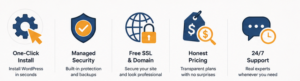
What to Look for in WordPress Hosting as a Beginner
Before comparing hosts, it helps to know what actually matters at this stage — a lot of hosting marketing pages are written for people who already know what they need:
- One-click WordPress install. You shouldn’t need to touch a server terminal to get WordPress running. Look for a one-click installer built into the control panel.
- Managed updates and security. Beginner-friendly hosts handle WordPress core updates, malware scanning, and basic security so you’re not responsible for patching vulnerabilities yourself.
- Free SSL and domain. A free SSL certificate is now table stakes; a free domain for the first year is a nice bonus that lowers your true starting cost.
- Real, honest pricing. Watch for the gap between the flashy “starting at” price and the renewal price after your first term — it’s often two to three times higher.
- Support that doesn’t assume you’re a developer. 24/7 live chat with beginner-friendly explanations matters more at this stage than an advanced developer toolkit you won’t touch for a year.
Best Web Hosting for WordPress Beginners, Compared
| Host | Best For | Starting Price | Key Feature |
|---|---|---|---|
| Hostinger | Budget-conscious beginners who still want speed | ~$1.99–2.69/mo | LiteSpeed servers + NVMe storage + AI-assisted site setup on every plan |
| Bluehost | Beginners who want the official WordPress.org recommendation | ~$1.99/mo intro (renews higher) | Free domain, WordPress-specific onboarding, and AI website builder |
| SiteGround | Beginners who prioritize support quality | ~$2.99/mo intro | Proprietary WordPress tools and widely praised live chat support |
| HostGator | Beginners who want a simple long-term commitment | ~$2.75/mo intro | Free domain and SSL on longer billing terms |
| GreenGeeks | Eco-conscious beginners who still want solid performance | ~$2.99/mo intro | Renewable-energy hosting with a tree planted per new account |
| Kinsta | Beginners with a bit more budget who want fully managed hosting | ~$35/mo | White-glove managed WordPress with no plugin/update maintenance required |
Hostinger: Best Value for Budget-Conscious Beginners
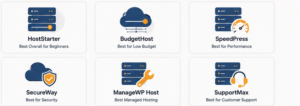
Hostinger consistently comes out as the strongest low-cost pick for a first WordPress site, and it doesn’t cut corners to get there — LiteSpeed Web Server and NVMe SSD storage come standard even on entry-level plans, which matters for page speed and Google’s Core Web Vitals. The hPanel control panel is built to be approachable, and the built-in AI assistant walks new users through setup step by step. The one thing to watch is that the cheapest plan skips daily backups and a CDN, both of which are worth adding or upgrading into once your site starts getting real traffic.
Bluehost: Best for WordPress.org’s Official Recommendation
Bluehost has been recommended directly by WordPress.org for years, which counts for something when you’re brand new and want a host that’s built specifically around the platform. It bundles a free domain and SSL on eligible plans, along with guided onboarding and an AI website builder aimed squarely at first-timers. The tradeoff is the introductory price jump at renewal — the low first-term rate is genuinely attractive, but budget for a meaningfully higher renewal cost after year one.
SiteGround: Best for Beginner-Friendly Support
If the thing you’re most worried about is getting stuck and not knowing who to ask, SiteGround’s reputation is built almost entirely around support quality. Its proprietary WordPress tools simplify staging, caching, and updates in ways that hide a lot of the technical complexity from a new user. It’s priced a bit higher than Hostinger at the entry level, but for beginners who’d rather pay slightly more for hand-holding than save a dollar and troubleshoot alone, it’s consistently one of the top-rated options.
FAQ: Best Web Hosting for WordPress Beginners
What is the cheapest good WordPress hosting for beginners? Hostinger is generally the strongest budget pick, offering LiteSpeed servers and NVMe storage even on its lowest-tier plan, with introductory pricing often under $3/month.
Is Bluehost or Hostinger better for a first WordPress site? Both are solid beginner choices — Bluehost carries WordPress.org’s official recommendation and strong guided onboarding, while Hostinger generally edges it out on raw performance and value at the entry-level price point.
Do I need managed WordPress hosting as a beginner, or is shared hosting enough? Shared hosting from a WordPress-optimized host (Hostinger, Bluehost, SiteGround) is enough for most beginner sites under roughly 25,000 monthly visits; fully managed hosting like Kinsta becomes worth the extra cost once your site grows or depends on uptime for revenue.
What should I watch out for in WordPress hosting pricing? The gap between the advertised “starting at” price and the renewal price — many hosts offer steep first-term discounts that jump significantly when your plan renews, so check the renewal rate before committing to a long billing term.
Do free WordPress hosting plans exist, and are they worth it? Free hosting exists but comes with real limitations — ads, storage caps, and no custom domain in most cases — so for anything beyond a throwaway test site, a low-cost paid plan from a host like Hostinger is almost always the better long-term choice.

The Verdict
There’s no single best web hosting for WordPress beginners — there’s a best fit for your budget and how much hand-holding you want. If price-to-performance is your priority, Hostinger is the strongest starting point. If you want the platform’s own official recommendation and guided onboarding, Bluehost is a safe, well-supported choice. And if your biggest fear is getting stuck with no one to ask, SiteGround’s support reputation makes it worth the slightly higher entry price. Pick based on what will actually get your site live and keep it running — not the flashiest homepage discount.
READ MORE:
Best Web Hosting for E-commerce Stores in 2026