
You finish the job, open a blank Word file, fight the table borders for twenty minutes, then realize you forgot the invoice number. A free invoice generator with PDF download fixes this. You type in your details, the totals calculate themselves, and you leave with a clean PDF ready to email. The catch is that “free” means different things across tools. Some are free forever, some are free until the second invoice, and some make you create an account before the download button works.
This guide compares the options US freelancers, contractors, and small agencies use most, plus what to check before you trust one with your billing.
What “Free Invoice Generator with PDF Download” Really Means
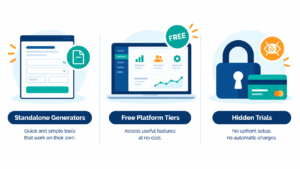
Free invoice tools fall into three groups, and knowing which one you’re using saves frustration later.
1. Standalone generators. You fill out a form and download a PDF. Some require no account at all. Invoice to PDF, for example, positions itself as a free online generator with no signup and no watermark on the document. capterra
2. Free tiers of full invoicing platforms. Tools like Wave, Square Invoices, and Zoho Invoice give you invoicing for free and make money elsewhere, usually on payment processing or paid upgrades. Square, for instance, lists a free plan with unlimited invoices, estimates, and customers, though processing fees apply when clients pay through Square. indiehackers
3. Free trials disguised as free tools. These let you build an invoice, then ask for a card or a subscription at the download step. Watch for this one.
What to Look For Before You Pick a Tool
Run any generator through this checklist:
- PDF without watermark. A logo from the tool on your invoice looks unprofessional to clients.
- No signup wall. Account creation matters less if you invoice often, but it’s a pain for one-off jobs.
- Invoice numbering. Sequential numbers matter for your records and for tax time.
- Tax and discount fields. US sales tax varies by state, so you need a flexible tax line.
- Data privacy. Some tools generate your PDF in the browser and store nothing. Others keep your client list on their servers.
- Payment links. Useful if you want clients to pay by card straight from the invoice, but it usually comes with processing fees.
Best Free Invoice Generators with PDF Download (Comparison)
| Name | Best For | Starting Price | Key Feature |
|---|---|---|---|
| Invoice to PDF | One-off invoices, no account | Free | No signup, no watermark |
| Invoice-Generator.com | Multi-currency invoices | Free | Download invoices in several currencies |
| Wave | Freelancers who want bookkeeping too | Free invoicing | Standalone generator plus accounting |
| Square Invoices | In-person plus online sellers | Free (processing fees apply) | Built-in Square payments |
| Zoho Invoice | Recurring invoices, Zoho users | Free tier (limits apply) | Invoice numbering and recurring billing |
| FreshBooks | Polished, client-facing invoicing | Paid (free trial) | Professional templates |
Pricing and limits change without notice. Confirm on each provider’s site before relying on any plan.
1. Invoice to PDF: Fastest for a One-Off Invoice
If you need an invoice in the next five minutes and don’t want an account, this is the simplest route. You fill in your details, watch the totals update live, and download the PDF. Its privacy pitch is that entered details are used once to generate your PDF and are never stored on its servers. That also means you can’t save a client list for next time. capterra
2. Invoice-Generator.com: Good for International Clients
This one is built around quick invoices in different currencies, which helps if you bill clients outside the US. It’s free to use, but check what happens to your saved invoices before you depend on it for record-keeping.
3. Wave: Best if You Want Accounting Later
Wave offers a standalone invoice generator where you can create customized invoices and download a PDF copy after entering your details. The standalone version is currently limited to US users, which suits this audience. Wave’s real advantage is that the same account grows into bookkeeping when you’re ready. indiehackers
4. Square Invoices: Best if You Already Use Square
Square is the obvious pick if you take card payments on-site. Invoices are free to send, but its value comes from the payment link embedded in the invoice. If you only need a PDF to email, you’re paying for features you won’t use.
5. Zoho Invoice: Best for Recurring Billing
Zoho Invoice suits freelancers with a handful of regular clients, thanks to recurring invoices and numbering controls. Free-tier limits have been described differently across sources (client and user caps), so check the current plan page before committing.
6. FreshBooks: Best Looking, but Not Free
FreshBooks is included because many people search for it alongside free tools. It offers a trial rather than a free plan, so it’s worth it only if you want polished invoices and accounting in one place.
How to Create an Invoice and Download It as a PDF
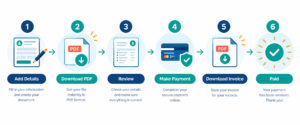
- Add your business details: name, address, email, and logo if the tool allows it.
- Add the client’s details and a unique invoice number (for example, INV-2026-001).
- List each line item with description, quantity, and rate.
- Apply tax or discounts if relevant to your state and service.
- Set payment terms: due date, accepted payment methods, late-fee wording.
- Preview, then download the PDF and email it with a short, friendly message.
Mistakes That Delay Payment
- Vague line items (“Consulting: $2,000”) instead of specific work.
- No due date, or a due date buried at the bottom.
- Missing payment instructions.
- Reusing invoice numbers, which causes confusion in your records.
- Sending the PDF with no follow-up schedule.
Is a Free Invoice Generator Enough for a Real Business?
For most solo freelancers and small service businesses, yes, at least at the start. A free generator handles unlimited invoices if you send a modest number each month. The limits show up when you want automatic reminders, recurring billing, expense tracking, or reports for your accountant. That’s the point to move to a free tier of a platform like Wave or Zoho, or to a paid tool.
FAQ
What is the best free invoice generator with PDF download?
It depends on your needs. For a fast one-off invoice with no account, Invoice to PDF works well. For invoicing that grows into bookkeeping, Wave is a common choice for US users.
Can I create an invoice online for free without signing up?
Yes. Several standalone generators let you build and download a PDF with no account. The tradeoff is that nothing is saved for next time.
Are free invoice generators safe to use?
Generally yes, but read the privacy policy. Prefer tools that don’t store your client data unless you want that feature.
Is a PDF invoice legally valid in the USA?
There’s no single federal invoice format, but a PDF showing the seller, buyer, date, itemized charges, and payment terms is standard business practice. Sales tax rules vary by state. This isn’t legal or tax advice, so ask an accountant if you’re unsure.
Do free invoice generators add watermarks?
Some do. Check a sample download before sending anything to a client.
Conclusion: Which Free Invoice Generator Should You Use?
If you need one invoice today, use a no-signup generator and download the PDF. If you’ll invoice every month, choose Wave or Zoho Invoice so numbering, client details, and history live in one place. Choose Square only if you already take payments through it. Test your first invoice yourself before sending it to a client.
Read More :
Best Free Quote Template for Agencies and Business (2026)
Best Reference Invoice Generator for Agencies and Business (2026)







One Comment