

Salesforce Alternatives for Small Businesses in 2026
You signed up for Salesforce because it’s the name everyone recognizes. Three months later you’re paying for add-ons you didn’t know existed, your team still isn’t fully onboarded, and the “small business” plan somehow costs more than you budgeted for the whole quarter. That’s not a you problem — it’s a Salesforce-for-small-teams problem, and it’s why so many small businesses go looking for something else within the first year.
Salesforce was built to scale into an enterprise sales org, and it shows in the pricing structure, the setup time, and the number of clicks it takes to do something simple. For a five-person team, that complexity is dead weight, not a feature. The good news: there’s a wide field of Salesforce alternatives for small businesses in 2026 that deliver the core CRM functionality — pipeline, contacts, automation, reporting — without the enterprise price tag or the implementation consultant.
This guide breaks down the strongest options, who each one actually fits, and where the real cost and complexity differences show up.
Why Small Businesses Look for a Salesforce Alternative
Before comparing tools, it’s worth being specific about what actually drives small teams away from Salesforce:
- Compounding costs. The advertised per-seat price rarely reflects the final bill once you add inbox integration, AI features, analytics, and implementation help.
- Steep learning curve. Most small teams don’t have a dedicated CRM administrator, and Salesforce genuinely expects one.
- Overbuilt for the use case. Features designed for enterprise sales orgs — complex approval chains, territory management, custom object architecture — go unused by a five- or ten-person team.
- Slow time to value. Teams often need weeks before the system is actually configured well enough to run day-to-day sales through it.
Best Salesforce Alternatives for Small Businesses, Compared
| CRM | Best For | Starting Price | Key Feature |
| HubSpot CRM | Teams that want sales, marketing, and service in one platform | Free (paid tiers from ~$20/mo) | Unified Hubs for sales, marketing, and service without separate purchases |
| Pipedrive | Sales-focused small teams that want a clean visual pipeline | ~$14/user/mo | Drag-and-drop deal stages with minimal setup |
| Zoho CRM | Budget-conscious teams that want room to customize | Free for up to 3 users | Deep customization at a low starting cost |
| Keap | Small businesses combining CRM with marketing automation | ~$40/mo | Built-in email marketing, invoicing, and appointment booking |
| Freshsales (Freshworks) | Teams wanting built-in AI lead scoring without extra add-ons | ~$15/user/mo | AI-based contact scoring included at lower tiers |
| SuiteCRM (open source) | Businesses wanting full data ownership and no licensing fees | Free (self-hosted) | Unlimited users and full customization with no per-seat cost |
HubSpot CRM: The Most Direct Salesforce Alternative
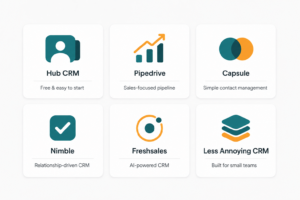
HubSpot is the closest thing to a like-for-like Salesforce replacement built specifically with small businesses in mind. Instead of stacking separate clouds and modules the way Salesforce does, HubSpot organizes everything into Hubs — Sales, Marketing, Service, and Operations — that you can run individually or together. The free CRM tier alone covers contact management, deal tracking, and email integration, which makes it a realistic starting point before you ever pay for anything. The tradeoff shows up as you grow: moving a lead all the way from first contact to invoice can still mean working across more than one Hub, so it isn’t fully single-pane-of-glass the way some newer tools are.
Pipedrive: Best for Sales-Only Small Teams
If your business runs almost entirely on outbound sales and deal tracking, Pipedrive strips out everything else and focuses on the pipeline itself. The visual, drag-and-drop deal board is genuinely easier to onboard a small team onto than Salesforce’s opportunity views, and most teams are running real deals through it within a day. The limitation is scope — Pipedrive doesn’t attempt to cover marketing automation or customer service, so you’ll likely pair it with separate tools as your operation grows.
Zoho CRM: Best Budget Pick With Room to Grow
Zoho‘s free plan supports up to three users, which makes it one of the most accessible entry points on this list for a very small team or solo operator hiring their first salesperson. Where Zoho earns its reputation is customization — you can reshape modules, fields, and workflows well beyond what most budget CRMs allow. That flexibility comes with a steeper learning curve than something like Pipedrive, so it rewards teams willing to spend a bit of time configuring it rather than expecting it to work well out of the box.
Keap: Best for Combining CRM and Marketing Automation
Keap is less a pure CRM and more a small business operations hub — CRM, email marketing, invoicing, and appointment scheduling all live under one login. Lead scoring highlights which prospects are worth chasing first, and the automation builder handles the repetitive follow-up work that otherwise falls through the cracks on a small team. It costs more out of the gate than Pipedrive or Zoho, but for a business that would otherwise be paying for a CRM and a separate email marketing tool, the combined cost can work out favorably.
SuiteCRM: Best Open-Source, No-License-Fee Option
For small businesses with some technical capacity — or a developer on staff or on retainer — SuiteCRM offers a genuinely Salesforce-like feature set (custom modules, workflow automation, unlimited users) without any per-seat licensing cost. You self-host it, which means you own your data outright and aren’t locked into a vendor’s pricing changes. The real cost shows up in setup and maintenance time rather than a monthly bill, so it fits businesses that would rather invest in configuration than in subscription fees.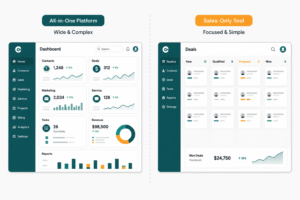
FAQ: Salesforce Alternatives for Small Businesses
What is the cheapest Salesforce alternative for small businesses? Zoho CRM’s free plan (up to 3 users) and HubSpot’s free CRM tier are generally the most accessible no-cost starting points, with SuiteCRM as a self-hosted, fully free option if you have the technical resources to run it.
Is HubSpot really cheaper than Salesforce? For small teams, usually yes — HubSpot’s free tier covers core CRM functionality that Salesforce doesn’t offer for free, and HubSpot’s paid tiers bundle sales, marketing, and service tools that would otherwise require separate Salesforce clouds.
Which Salesforce alternative is easiest to set up? Pipedrive and HubSpot’s free CRM are both commonly cited as same-day setups, since neither requires the extensive configuration or admin training Salesforce typically does.
Can a small business fully replace Salesforce with a free CRM? For teams under roughly 10 people with straightforward sales processes, yes — free tiers from HubSpot or Zoho often cover the core needs. Larger or more complex sales processes usually outgrow the free tier eventually.
Do Salesforce alternatives integrate with the same tools? Most major alternatives (HubSpot, Pipedrive, Zoho, Freshsales) integrate with common small business tools like Gmail, Outlook, Slack, and QuickBooks, though the depth of integration varies by platform and pricing tier.
The Verdict
There’s no universal replacement for Salesforce — there’s a better fit for how your team actually sells. If you want the closest all-in-one replacement, start with HubSpot’s free tier. If your process is pure pipeline management, Pipedrive keeps it simple. If budget is the main constraint, Zoho’s free plan gives you real room to grow. And if you’d rather own your data outright and skip subscription fees entirely, SuiteCRM is worth the setup time. Match the tool to your sales process, not the brand name on the login screen.





One Comment