
A vague quote can cost you a client. It might be a one-line email with a number, a PDF with no expiry date, or a Word file where the scope reads “design work, as discussed.” The prospect hesitates, you start negotiating, and two weeks later you find out they went with someone who sent a cleaner proposal.
A good free quote template fixes that. It shows the client exactly what they get, what it costs, and how long the price is valid. This guide covers what a strong quote contains, which free templates and tools are worth using in the USA, and how to pick the right one for your agency or business.
What Is a Quote Template (and Why Agencies Need One)?
A quote template is a reusable document that lists the services, prices, terms, and validity period you are offering a prospective client. You fill in the details instead of rebuilding the document each time.
Agencies, freelancers, and service businesses benefit most because their work is custom. Every project differs, but the structure of the quote should not. A consistent template does three things:
- Saves time. A quote that took 45 minutes to build takes about 10.
- Reduces scope disputes. Written line items and exclusions give you something to point to later.
- Looks credible. A branded, organized quote signals a business that runs well.
Quote, estimate, and proposal are often used interchangeably, but they differ. A quote is a fixed price offer. An estimate is an approximate cost that may change. A proposal is a longer document that includes strategy, deliverables, and case studies alongside pricing. If your price is firm, use a quote. If scope is uncertain, label it an estimate and say so.
What a Good Business Quote Template Must Include
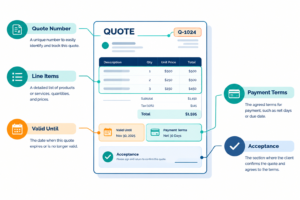
Before comparing tools, check that any template you choose has these fields:
- Your business details: name, logo, address, email, phone, and EIN or business ID if relevant.
- Client details: company name, contact person, billing address.
- Quote number and date: numbering makes tracking and bookkeeping easier.
- Valid-until date: typically 14 to 30 days. Without one, you may be held to an outdated price.
- Itemized services or products: description, quantity, unit price, and line total.
- Taxes and discounts: US sales tax rules vary by state and by service type, so confirm what applies to you.
- Scope and exclusions: a short note on what is not included prevents most disputes.
- Payment terms: deposit amount, milestones, net-15 or net-30, accepted payment methods.
- Acceptance section: a signature line or an “Accept quote” button.
If a template lacks the valid-until date, exclusions, or acceptance section, you will be adding them by hand each time.
Best Free Quote Template Options for Agencies and Business
The best option depends on how you work. Here are the main routes, from simplest to most automated.
1. Word and Google Docs Templates (Best for Simple, Fully Custom Quotes)
If you quote a few jobs a month, a Word or Google Docs template is hard to beat. It is free, familiar, and fully editable, and you control every detail of the layout. Google Docs adds easy sharing and version history.
The downside is that nothing is automated. You calculate totals manually or with a table formula, track quote numbers yourself, and have no built-in way to see whether the client opened the quote. It works well up to a modest volume and gets messy beyond that.
2. Excel and Google Sheets Templates (Best for Calculations)
A price quote template in Excel or Google Sheets handles the math for you: line totals, tax percentage, discounts, and grand total update automatically. This suits product-based businesses or agencies with standard service packages.
Keep one locked “calculation” area and one clean “print” area so clients see a tidy quote, not a spreadsheet grid. Export to PDF before sending.
3. Canva (Best for Branded, Design-Forward Quotes)
Canva has free quote and proposal templates, which suit creative agencies that want the quote itself to reflect their brand. You can match colors, fonts, and your logo in minutes.
Canva is a design tool, not an accounting tool. It will not calculate totals or track acceptance, so double-check your numbers before sending.
4. HubSpot (Best Free Option if You Already Use a CRM)
HubSpot offers free quote templates, and its free CRM tools let you tie quotes to contacts and deals. Agencies that already manage leads in HubSpot get a clear advantage: the quote sits next to the deal, the emails, and the follow-up history.
Check HubSpot’s current plan page, since some quote features, such as customizable templates, e-signature, and payments, depend on the plan tier.
5. Zoho Invoice and Zoho Books (Best for Estimate-to-Invoice Workflows)
Zoho’s invoicing tools let you create estimates, send them to clients, and convert accepted estimates into invoices. That removes re-entry, which is where errors creep in. Zoho also fits businesses that eventually want accounting, inventory, or CRM in one ecosystem.
6. Square (Best for Local and Service Businesses)
Square’s free invoicing tools include estimates, and you can convert them to invoices after approval. If you already take payments through Square, this keeps quoting, invoicing, and getting paid in one place. It suits contractors, studios, salons, and other local service businesses.
7. PandaDoc (Best for Proposals With E-Signatures)
PandaDoc is built for sales documents. It offers quote and proposal templates, document tracking, and e-signatures. Free access is limited, and features such as templates, integrations, and payments vary by plan, so confirm what is included before committing. It is worth a look if your quotes regularly turn into signed agreements.
Comparison Table
Pricing and plan limits change often, so verify on each provider’s site before you commit.
| Name | Best For | Starting Price | Key Feature |
|---|---|---|---|
| Word / Google Docs | Simple, custom quotes | Free | Full layout control |
| Excel / Google Sheets | Auto-calculated totals | Free | Formulas for tax and discounts |
| Canva | Brand-focused creative agencies | Free plan available | Design flexibility |
| HubSpot | Agencies using a CRM | Free tools available; paid tiers for advanced features | Quotes tied to deals and contacts |
| Zoho Invoice / Books | Estimate-to-invoice workflow | Free plan available for Zoho Invoice; check current limits | Convert estimates to invoices |
| Square | Local service businesses | Free invoicing tools; processing fees apply on payments | Quote, invoice, and payment together |
| PandaDoc | Proposals needing e-signature | Free tier available; paid plans for full features | Document tracking and e-sign |
How to Choose the Right Free Quote Template
Match the tool to your volume and workflow:
- Under 5 quotes a month, simple services: a Word or Google Docs template is enough.
- Product pricing or lots of math: use a Sheets or Excel template.
- Brand matters to your pitch: design in Canva, but calculate in a spreadsheet first.
- You already track leads in a CRM: use that CRM’s quote feature so nothing lives in two places.
- Quotes become invoices: pick a tool such as Zoho or Square that converts them.
- Clients need to sign: choose something with e-signature, or add a signature line and send a PDF.
One practical tip: whatever you choose, test it by sending a quote to yourself. Check how it looks on a phone, since many clients open quotes on mobile.
Tips to Get Quotes Accepted Faster
A template only gets you so far. These habits improve your close rate:
- Respond quickly. Sending a quote within 24 hours of the conversation keeps your offer fresh.
- Be specific. “Homepage design, up to 3 revisions” beats “web design.”
- Offer two or three packages. A good/better/best structure gives clients a choice beyond yes or no.
- State what is excluded. It protects your margin and sets expectations.
- Set a deadline. A valid-until date nudges decisions without pressure.
- Follow up. A short email three to five days later often does more than the quote itself.
Common Mistakes to Avoid
- Sending a quote with no expiry date.
- Mixing up quotes and estimates, then billing more than quoted.
- Leaving out payment terms or deposit requirements.
- Using an old template with another client’s name still in it.
- Skipping a legal review for large contracts. A quote is not a contract, but accepted quotes can carry weight, so for bigger deals have the terms checked by a qualified professional.
FAQ
What is the best free quote template for small businesses?
For most small businesses, a Google Docs or Excel template is the best place to start because it is free and fully editable. If you want automation and acceptance tracking, tools such as Zoho Invoice or Square are good upgrades.
How do I write a price quote for a service?
List your business and client details, give the quote a number and date, itemize each service with a price, add taxes and discounts, state exclusions and payment terms, and set a valid-until date. Finish with an acceptance line.
Is a quote legally binding?
It depends. A quote usually becomes binding once the client accepts it, and your terms and state law can affect that. For high-value work, have a contract reviewed by a qualified professional.
What is the difference between a quote, an estimate, and an invoice?
A quote is a fixed price offer. An estimate is an approximate cost that may change. An invoice is a request for payment after work is done or a deposit is due.
How long should a quote be valid?
Most businesses use 14 to 30 days. Use a shorter window if your costs change often.
Conclusion: Which Free Quote Template Should You Use?
For most agencies and small businesses, start with a free quote template in Google Docs or Sheets. It costs nothing and covers the essentials. Once you are sending several quotes a month, move to a tool that tracks acceptance and converts quotes to invoices: HubSpot if you live in a CRM, Zoho or Square if invoicing matters most, and PandaDoc if signatures are central to your sales process.
Whichever you choose, make sure every quote has line items, exclusions, payment terms, and an expiry date. Those four details prevent most of the problems that cost agencies time and money.
Read More :
Best Reference Invoice Generator for Agencies and Business (2026)
Best Free Invoice Maker for Agencies and Business (2026 Guide)





One Comment