
Every “free” invoice generator makes money somewhere. Some charge on card payments. Some cap how many clients you can bill. Some stamp their logo on every invoice you send. The tool that looks cheapest on day one can quietly cost you the most by month six.
This guide compares the best free invoice generator options for small agencies and businesses in the USA, with the limits and fees that matter. It’s built from published pricing and feature details, not vendor marketing copy.
What a free invoice generator should actually do
A basic PDF template is fine for a one-off freelance gig. A small agency or business needs more:
- Recurring invoices for retainers and monthly clients
- Online payments (card and ACH) so you get paid faster
- Automatic reminders so you stop chasing late payers
- Branding control so invoices look like they came from your business
- Room to grow without a forced upgrade at your fifth client
If a tool fails two or more of these, it’s a template, not a generator.

Quick comparison: best free invoice generators
| Name | Best For | Starting Price | Key Feature |
|---|---|---|---|
| Wave | Very small businesses wanting free books too | Free; Pro is $19/mo | Free invoicing plus accounting |
| Zoho Invoice | Agencies wanting the most features at $0 | Free forever | Recurring invoices, client portal, multiple payment gateways |
| Invoice Ninja | Agencies wanting customization or self-hosting | Free for 5 clients; Pro $14/mo | Open source, client portal on the free plan |
| Square Invoices | Businesses already using Square | Free plan available | Invoices plus in-person payments |
| FreshBooks | Service businesses ready to pay for polish | From $23/mo | Invoicing with light accounting |
| PayPal Invoicing | Clients who already pay via PayPal | No software fee | No subscription needed Best Invoicing Software for Freelancers (2026) +4 |
1. Wave: best free invoice generator with built-in bookkeeping
Wave is the rare free product that isn’t bait. Its free tier covers invoicing plus expense tracking, receipt scanning and reporting, which is a lot for $0. wearefounders
The catch is payment fees. Card processing on the free plan runs 2.9% + $0.60 per transaction. That $0.60 fixed fee hurts on small invoices. On a $50 invoice, fees take about 4.1%. Support on the free tier is thin, so expect self-service. duppledupple
Also note that Wave’s standalone free invoice generator is currently restricted to U.S. users. That’s fine for this audience. indiehackers
Choose Wave if you’re a solo operator or tiny team that wants invoicing and basic bookkeeping in one login.
2. Zoho Invoice: the free invoicing software most agencies overlook
Zoho Invoice is completely free and the feature list reads like a paid product. It includes recurring invoices, a customer portal and payment gateways, which covers most of what an agency retainer workflow needs. dupplefuzen
Two limits to know:
- Invoice caps. One review cites a limit of 2 users and 500 invoices a year, while others list higher figures. Confirm the current cap on Zoho’s pricing page before committing. fuzen
- Branding. Every invoice carries “Powered by Zoho Invoice” branding. For an agency selling polish, that may be a dealbreaker. wearefounders
Zoho also doesn’t process payments itself. You connect Stripe, PayPal or another gateway and pay their fees. dupple
Choose Zoho Invoice if you want the deepest feature set for free and don’t mind the branding.
3. Invoice Ninja: best free invoice software for customization
Invoice Ninja is open source. Its free cloud plan covers 5 clients with unlimited invoices, and the client portal is included on the free plan. It’s the only genuinely uncapped free option, since you can self-host it. Best Invoicing Software for Freelancers (2026) +2
The tradeoff is effort. Self-hosting means managing a server, updates and backups. If that sounds like a headache, use the hosted version and upgrade later: Ninja Pro is $14/month, or $140/year, for unlimited clients and no branding. dupple
Choose Invoice Ninja if you have technical comfort or want multiple templates and a branded client portal.
4. Square Invoices: best if you already take Square payments
Square Invoices doesn’t charge a regular monthly fee, and the free plan includes estimates, contracts, deposits, recurring invoices and reminders. The cost shows up in processing: 3.3% + $0.30 per online card payment on the free plan, versus 2.9% + $0.30 on the Plus plan. square invoice fees +2
Square also holds up well on both sides of a sale. It’s the obvious move if you already swipe cards with Square, though outside that world there’s less reason to choose it. dupple
Choose Square if you run a hybrid business with in-person sales and invoiced work.
5. FreshBooks: when “free” stops being the goal
FreshBooks isn’t a free tool, but it’s the most common upgrade path. Plans start from $23/mo, and the Lite plan caps you at 5 billable clients. Card payments cost 2.9% + $0.30, with 1% on ACH bank transfers. Best Invoicing Software in 2026: 9 Tools I Tested and Ranked +2
You’re paying for polish and support. For a client-facing agency, that can be worth it, but only once invoicing volume justifies it.
6. PayPal Invoicing: free if your clients already use PayPal
PayPal Invoicing has no software fee, so it works as a zero-setup option. The tradeoff is limited customization and no real project or accounting tools. It suits one-off or occasional billing better than agency retainers. toolradar
How to choose the best free invoice generator for your business
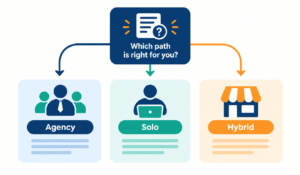
For a small agency with retainers: Zoho Invoice or Invoice Ninja. Both support recurring billing and client portals. Pick Invoice Ninja if branding matters, Zoho if features matter more.
For a solo operator or tiny business: Wave, if you also want bookkeeping and can live with the $0.60 fixed card fee.
For a business that also sells in person: Square Invoices.
For a business that wants to stay free as it grows: Self-hosted Invoice Ninja is the only option without client or invoice caps.
Hidden costs of free invoicing tools
Three costs to check before you commit:
- Payment processing fees. These are usually where “free” tools earn their money. Compare the fixed per-transaction fee, not just the percentage.
- Caps. Client limits, invoice limits and user limits all force upgrades at awkward moments.
- Branding. Free tiers often put the vendor’s name on your invoices. For agencies, that affects how clients see you.
You can also sidestep card fees by encouraging ACH or bank transfer, and by invoicing larger amounts less often.
Free invoice generator FAQ
What is the best free invoice generator for small business?
For most small businesses, Zoho Invoice has the strongest free feature set, and Wave is the best free option if you also want bookkeeping. Invoice Ninja is best if you want customization or no caps.
Is there a free invoice generator with no hidden fees?
No tool is entirely fee-free if you accept card payments, since gateways charge processing fees. Invoice creation itself is free in Wave, Zoho Invoice, Square and Invoice Ninja’s free plan, so you pay only when clients pay by card.
Can I use a free invoice generator for recurring invoices?
Yes. Zoho Invoice and Square both include recurring invoices on their free plans, and Invoice Ninja’s free plan supports them too.
Do free invoice generators work for agencies with multiple clients?
They can, but watch the caps. Invoice Ninja’s hosted free plan stops at 5 clients, and Zoho limits annual invoices and users. Agencies growing past those limits should plan an upgrade or self-host.
Are free invoice generators legal and acceptable for U.S. tax records?
Yes, as long as the invoice includes the standard details: your business name, client, date, itemized services, amount and payment terms. Check with your accountant for anything state-specific.
Conclusion: our recommendation
If you want one answer, start with Zoho Invoice for the best free feature set, and accept the branding trade-off. If branding or customization matters, choose Invoice Ninja. If you also need bookkeeping and mostly bill solo, choose Wave. Move to a paid tool like FreshBooks only when caps, support or branding start costing you more than the subscription would.
Whichever you choose, test it with one real invoice before moving your whole client list over.
Read More :






One Comment